
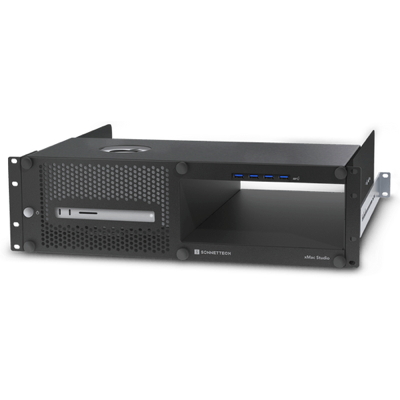
xMac Studio (no module) – 3U Rackmount Enclosure with empty bay
RRP: $2228.00 including GST
Part Code: XMAC-STD-0
Prod Desc: xMac Studio (no module) – 3U Rackmount Enclosure with empty bay
Stock On Hand: 0
Stock ETA: 12 Days
Warranty: 2 Years

Information
Designed for Mac Studio with Expansion Bay to Connect Speciality Audio and Video Cards
For many creative professionals, PCIe card expansion is not an option – its a necessity for connecting specialty cards to handle audio and video post-production projects. xMac Studio is a rugged steel 3U rackmount enclosure for securing a Mac Studio with optional PCIe card expansion module in a rack, placing the Mac Studio behind a quick and easy to remove front panel. Sonnet designed the xMac Studio for pro workflow flexibility; a rugged steel enclosure protects the Mac Studio while an expansion bay provides the option for a Sonnet Echo III or Echo I PCIe Card Expansion Module.
Features
Use high-performance PCIe cards with the Mac Studio.
*Makes Your Mac Studio Road-ready
3U rackmount enclosure with firm rubber cushions securely holds the Mac Studio and Thunderbolt expansion module in place, adding mobility to your workflow.
*Ideal for Use in Server Rooms
Standard mounting holes and included adjustable rack rails enable easy installation into any standard server rack up to 24” deep.
*Front to Back Airflow Management
Supports direct airflow through the enclosure, Mac Studio, and Thunderbolt expansion module to keep them operating as cool in a rack as on a desk, even when the xMac Studio is mounted between two other rack-mounted components.
*Front Panel Power Switch and Integrated USB-A Ports
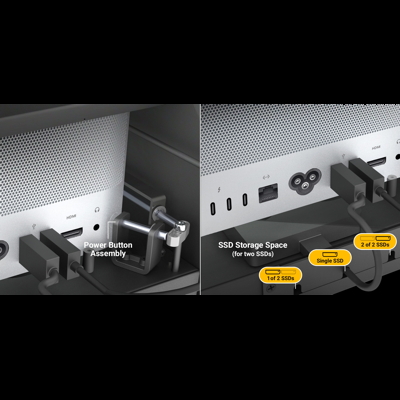
Front panel button enables operation of the computer’s rear-mounted power switch; integrated USB-A hub enables connection of four USB peripherals to the Mac Studio.
*Easy Access
No tools required – removable front panel secured with thumbscrews allows easy installation of and access to the Mac Studio. Secured with three thumbscrews on the back, the Thunderbolt expansion module can be removed and reinstalled through the front of the enclosure without removing the front plate.
*Space for Storage
Behind a covered opening beneath the computer is a space to place two Thunderbolt or USB SSDs (sold separately); two included adhesive-backed magnets secure them in place.
*Open Slot and Port Access
Provides access to the computer’s SD card slot and front and back panel ports, enabling you to connect and disconnect cables easily.